Results & Actions Configuration
After clicking Generate Activity Log results will be displayed in the results table. There are three views available: Aggregated View, Detailed View and Work item View. You can configure logged actions list by clicking “Actions” drop down menu.
List of the logged actions
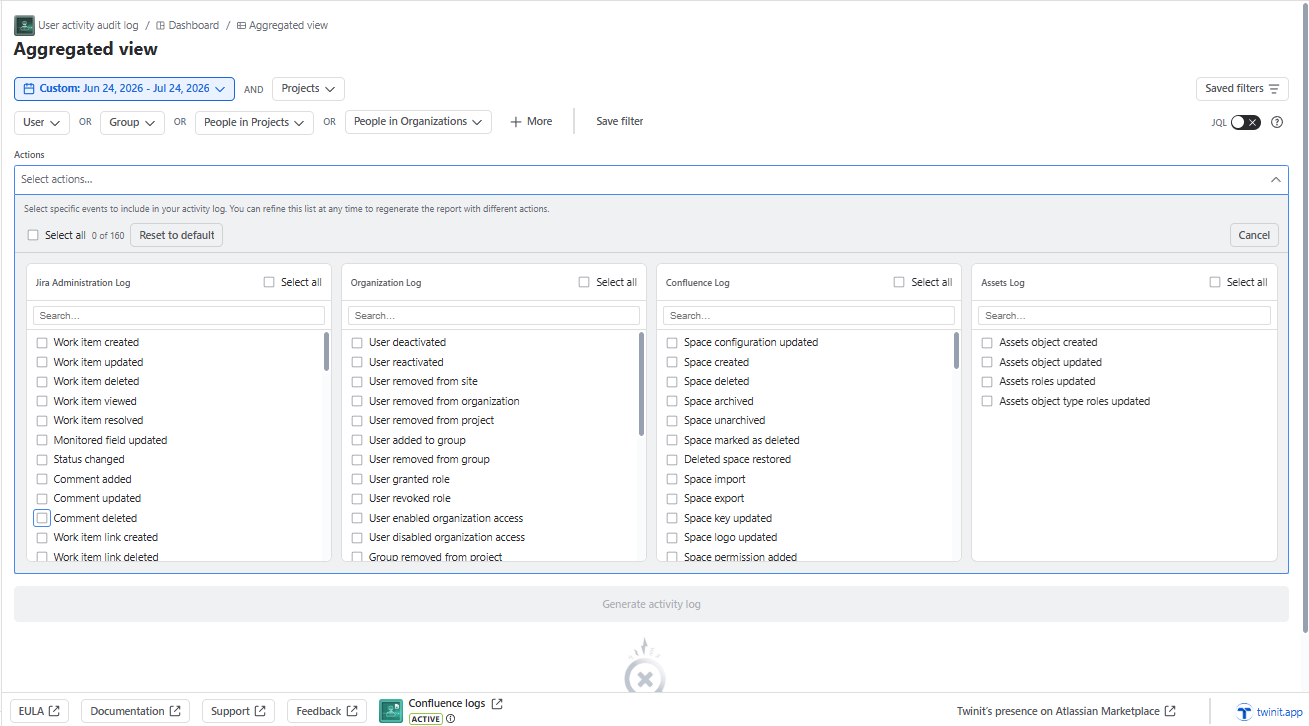
For the list of logged Confluence actions, see Confluence logs.
Work item created
Work item updated
Work item deleted
Work item resolved
- Requires initial configuration of the connection to Jira Administration Log.
- Retrieving this action into the app may take up to 30 minutes.
Status changed
- Requires initial configuration of the connection to Jira Administration Log.
- Retrieving this action into the app may take up to 30 minutes.
Comment added
Comment updated
Comment deleted
Work item link created
Work item link deleted
Worklog created
Worklog updated
Worklog deleted
Project created
Project updated
Project deleted
Project role created *
- Requires initial configuration of the connection to Jira Administration Log.
- Retrieving this action into the app may take up to 30 minutes.
Project role updated *
- Requires initial configuration of the connection to Jira Administration Log.
- Retrieving this action into the app may take up to 30 minutes.
Project role deleted *
- Requires initial configuration of the connection to Jira Administration Log.
- Retrieving this action into the app may take up to 30 minutes.
- Retrieving this action into the app may take up to 30 minutes.
Project category changed *
- Requires initial configuration of the connection to Jira Administration Log.
User created
This action also logs “Invite user“ and “Grant access“ actions from Atlassian Guard
- Requires initial configuration of the connection to Atlassian Guard.
Retrieving this action into the app may take up to 30 minutes.
User updated
User deleted
This action also logs “Remove user“ and “Revoke access“ actions from Atlassian Guard
- Requires initial configuration of the connection to Atlassian Guard.
Retrieving this action into the app may take up to 30 minutes.
Due to the API restrictions, in case of “user deleted“, the author of the action will be indicated as JIRA.
User deactivated (requires Atlassian Guard on the instance)
- Requires initial configuration of the connection to Atlassian Guard.
- Retrieving this action into the app may take up to 30 minutes.
User reactivated (requires Atlassian Guard on the instance)
- Requires initial configuration of the connection to Atlassian Guard.
- Retrieving this action into the app may take up to 30 minutes.
User last active
- The Data/time when the last action of the user was logged either in the Administration, Organization or Assets log.
- Includes user last login action (i.e. when the logged out user logged in, not when the logged in user opens Jira).
- Except for the rare cases after changing the logic of defining last action (10-Jul-2024), only one “last active“ log will be visible in the log.
- Retrieving this action into the app may take up to 30 minutes.
User added to group
- Viewing the actor requires the initial configuration of the connection to Atlassian Guard. Otherwise the actor will be visible as JIRA.
- Retrieving this action into the app may take up to 30 minutes.
User removed from group
- Viewing the actor requires the initial configuration of the connection to Atlassian Guard. Otherwise the actor will be visible as JIRA.
- Retrieving this action into the app may take up to 30 minutes.
User removed from site (requires Atlassian Guard on the instance)
- Requires initial configuration of the connection to Atlassian Guard.
- Retrieving this action into the app may take up to 30 minutes.
User invited to site (requires Atlassian Guard on the instance)
- Requires initial configuration of the connection to Atlassian Guard.
- Retrieving this action into the app may take up to 30 minutes.
User detail changed (requires Atlassian Guard on the instance)
- Requires initial configuration of the connection to Atlassian Guard.
- Retrieving this action into the app may take up to 30 minutes.
Group created
- Requires initial configuration of the connection to Atlassian Guard.
- Retrieving this action into the app may take up to 30 minutes.
Group removed
- This actions triggered when the group is removed from the project.
- Retrieving this action into the app may take up to 30 minutes.
User removed from project
- This action is triggered when a user or group is removed from the project via “People and access” (People and Role).
- Requires initial configuration of the connection to Jira Administration Log.
- Retrieving this action into the app may take up to 30 minutes.
Group deleted
- Requires initial configuration of the connection to Atlassian Guard.
- Retrieving this action into the app may take up to 30 minutes.
Api token created
- Requires initial configuration of the connection to Atlassian Guard.
- Retrieving this action into the app may take up to 30 minutes.
Api token revoked
- Requires initial configuration of the connection to Atlassian Guard.
- Retrieving this action into the app may take up to 30 minutes.
Version released
Version unreleased
Version created
Version moved
Version updated
Version deleted
Option voting changed
Option watching changed
Option unassigned work items changed
Option subtasks changed
Option work item links changed
Option time tracking changed
Sprint created
Sprint deleted
Sprint updated
Sprint started
Sprint completed
Board created (will not be logged for Discovery Project boards)
Board updated (will not be logged for Discovery Project boards)
Board deleted (will not be logged for Discovery Project boards)
Board configuration changed (will not be logged for Discovery Project boards)
Assets object created (requires Jira Service Management Premium)
- Requires initial configuration of the connection to Assets.
- Retrieving this action into the app may take up to 60 minutes.
- Log visibility depends on the Assets and app permissions ***
Assets object updated (requires Jira Service Management Premium)
- Requires initial configuration of the connection to Assets.
- Retrieving this action into the app may take up to 60 minutes.
- Log visibility depends on the Assets and app permissions ***
Attachment created
Attachment deleted
Work item type created
Work item type updated
Work item type deleted
Filter created
Filter updated
Filter deleted
Permission scheme created *
- Requires initial configuration of the connection to Jira Administration Log.
- Retrieving this action into the app may take up to 30 minutes.
Permission scheme copied *
- Requires initial configuration of the connection to Jira Administration Log.
- Retrieving this action into the app may take up to 30 minutes.
Permission scheme deleted *
- Requires initial configuration of the connection to Jira Administration Log.
- Retrieving this action into the app may take up to 30 minutes.
Permission scheme updated *
- Requires initial configuration of the connection to Jira Administration Log.
- Retrieving this action into the app may take up to 30 minutes.
Permission added *
- Requires initial configuration of the connection to Jira Administration Log.
- Retrieving this action into the app may take up to 30 minutes.
Permission deleted *
- Requires initial configuration of the connection to Jira Administration Log.
- Retrieving this action into the app may take up to 30 minutes.
Global permission added *
- Requires initial configuration of the connection to Jira Administration Log.
- Retrieving this action into the app may take up to 30 minutes.
Global permission deleted *
- Requires initial configuration of the connection to Jira Administration Log.
- Retrieving this action into the app may take up to 30 minutes.
Customer permissions changed *
- Requires initial configuration of the connection to Jira Administration Log.
- Retrieving this action into the app may take up to 30 minutes.
Agent Portal Announcement Update Permission *
- Requires initial configuration of the connection to Jira Administration Log.
- Retrieving this action into the app may take up to 30 minutes.
Permission scheme added to project *
- Requires initial configuration of the connection to Jira Administration Log.
- Retrieving this action into the app may take up to 30 minutes.
Project roles changed *
- Requires initial configuration of the connection to Jira Administration Log.
- Retrieving this action into the app may take up to 30 minutes.
JIRA Service Desk configuration *
- Requires initial configuration of the connection to Jira Administration Log.
- Retrieving this action into the app may take up to 30 minutes.
Login-free portal settings changed *
- Requires initial configuration of the connection to Jira Administration Log.
- Retrieving this action into the app may take up to 30 minutes.
Public signup enabled *
- Requires initial configuration of the connection to Jira Administration Log.
- Retrieving this action into the app may take up to 30 minutes.
Public signup disabled *
- Requires initial configuration of the connection to Jira Administration Log.
- Retrieving this action into the app may take up to 30 minutes.
Requirement for email verification for signup changed *
- Requires initial configuration of the connection to Jira Administration Log.
- Retrieving this action into the app may take up to 30 minutes.
Help center permissions changed *
- Requires initial configuration of the connection to Jira Administration Log.
- Retrieving this action into the app may take up to 30 minutes.
Help center updated *
- Requires initial configuration of the connection to Jira Administration Log.
- Retrieving this action into the app may take up to 30 minutes.
Scheduled deletion of account
- Requires initial configuration of the connection to Atlassian Guard.
- Retrieving this action into the app may take up to 30 minutes.
Canceled deletion of account
- Requires initial configuration of the connection to Atlassian Guard.
- Retrieving this action into the app may take up to 30 minutes.
Assets roles updated
- The action is logged every 30 minutes **
- Log visibility depends on the Assets and app permissions ***
Assets object type roles updated
- The action is logged every 30 minutes **
- Log visibility depends on the Assets and app permissions ***
User enabled site access
- Requires initial configuration of the connection to Atlassian Guard.
- Retrieving this action into the app may take up to 30 minutes.
User disabled site access
- Requires initial configuration of the connection to Atlassian Guard.
- Retrieving this action into the app may take up to 30 minutes.
User enabled organization access (requires Atlassian Guard on the instance)
- Requires initial configuration of the connection to Atlassian Guard.
- Retrieving this action into the app may take up to 30 minutes.
- User disabled organization access (requires Atlassian Guard on the instance)
Requires initial configuration of the connection to Atlassian Guard.
- Retrieving this action into the app may take up to 30 minutes.
Work Item View
User granted role (requires Atlassian Guard on the instance)
- Requires initial configuration of the connection to Atlassian Guard.
- Retrieving this action into the app may take up to 30 minutes.
User revoked role (requires Atlassian Guard on the instance)
- Requires initial configuration of the connection to Atlassian Guard.
- Retrieving this action into the app may take up to 30 minutes.
User removed from organization
- Requires initial configuration of the connection to Atlassian Guard.
- Retrieving this action into the app may take up to 30 minutes.
User invited to organization (requires Atlassian Guard on the instance)
- Requires initial configuration of the connection to Atlassian Guard.
- Retrieving this action into the app may take up to 30 minutes.
- These actions are retrieved every 30 minutes. Therefore the action can appear in the log maximum after 30 minutes.
** The action is logged every 30 minutes. This means that the log will reflect the changes at the moment of the synchronization. If the schema role is updated several times during this 30-minute period, the log will reflect only the first and the last updates.
*** These actions will be visible if:
The user has Administrator or Manager role in the app AND the user is added to one of the roles of the corresponding Assets schema:
- Object schema managers
- Object schema developers
- Object schema users
The user has Administrator or Manager in the app AND the user has Jira Administrator permission.
The actions are visible for users with Administrator or Manager in the app or with Administrator role in Jira, unless the work item security is applied to certain work items. For the work items with the security level, only the number of actions will be visible in the Aggregated view.