Actions Detail View
You can see the detailed view of the actions by clicking the Detail view tab:
The actions in the work items with a security level, will not be visible in the detail view!
For each action you can see the following information:
Date
- Date and time when the action was done
Author
- The user who did the action
- The user name is clickable and the user profile will be opened on the new tab.
Target
- The item which was affected - work item, status, comment, work item link, worklog, project, user, version, sprint, board, global feature
Action
- Action that was done by the user, e.g. board configuration changed, work item deleted, commented, etc.
Project
- The project where the action was done (Might be N/A in some cases, e.g. when the user was created or updated
Details
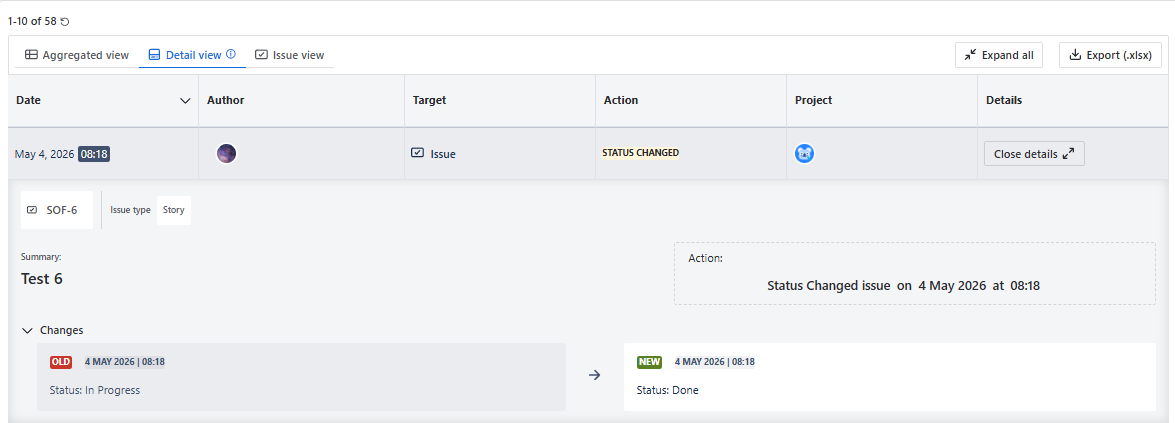
- You can view the details of the action by clicking View details button, or by clicking the table row anywhere:
You can click the column to sort the results.
You can expand/collapse all the actions by clicking “Expand all” or “Collapse all“ buttons.
From the details, you can see the following information:
User who did the action
Which action was done
When the action was done
The affected object
In case of work items:
- work item key
- work item type
- work item summary
- Request type
- You can see the work item key and can open the work item by clicking Open button.
Changes
Old value and new value
- Some of the actions (e.g. “Version released”, “Version unreleased”, “Asset Created”) do not have Changes section.
Old and new values are available only for work items. For most of the other objects, the values will show N/A.
Work item Type and Request Type are shown only for the work items which were created after installation of the User Activity Audit Log app!
Remarks
There are a few limitations in the results due to the limitations of the corresponding REST API:
- When the board is deleted, the corresponding Project name will not be shown in the Detail View.
- Project deleted will be shown in the actions after the project is deleted from the trash.
- The three actions related to Atlassian Access (user reactivation, deactivation and last activity date/time) will be retrieved every 1 hour.