Send An Email With The Attachments
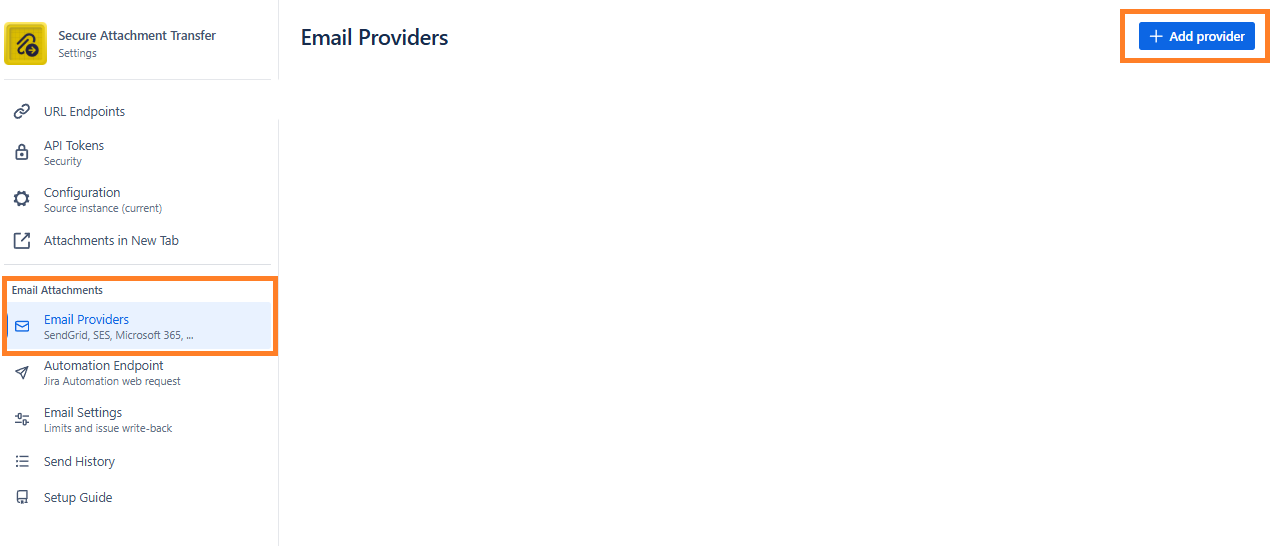
You can send an email with the attachments. To do so click “Email Providers” tab and follow the setup guide:
Setup Guide
A Jira Automation rule sends a web request to this app. The app downloads the issue attachments, builds the email and hands it to the email provider you configured. Nothing is sent from Jira itself, and no issue panel is involved.
Four steps
Do them once per site. Each rule then only needs its own JSON body.
Add an email provider (Email Providers tab in sidebar menu)
Pick a provider type, enter the sender address and the API credentials, then use Send test email to confirm delivery. The first provider becomes the default; a rule can name another one with the provider field.
Create an API token (Automation Endpoint tab in sidebar menu)
Tokens authenticate the web request. Create one per rule or team so you can revoke them separately. The token is shown once; copy it straight into the rule.
Build the Automation rule
In Jira go to Project settings → Automation → Create rule. Choose any trigger, for example Issue transitioned or Issue commented, then add the action Send web request and fill it in with the values from the section below.
- Web request URL: the endpoint URL. HTTP method: POST.
- Headers:
AuthorizationwithBearer <token>, andContent-Typewithapplication/json. Mark the Authorization header as hidden. - Web request body: Custom data, paste the JSON. Smart values such as
{{issue.key}}are resolved by Jira before the request is sent. - Leave Delay execution until the response is received off unless the rule uses
"mode": "sync".
**Test and watch the history (**Send History tab in sidebar menu)
Run the rule on an issue with attachments, or use Validate in the rule editor. Every send appears in Send History with its status, recipients and any provider error. Limits such as maximum attachment size and allowed recipient domains live in Email Settings.
Call it from Jira Automation
Add a “Send web request” action to any rule and paste the values below.
- **Web request URL (**Method POST)
https://c59d8607-9432-4776-9fcf-a8479343beeb.hello.atlassian-dev.net/x1/jBUoLUH4jzfrRbvkiJCjb5mOWEc
Headers
Authorization: Bearer <your API token>
Content-Type: application/jsonBody (custom data)
{
"issueKey": "{{issue.key}}",
"attachmentIds": "all",
"to": ["{{issue.reporter.emailAddress}}"],
"subject": "{{issue.key}}: {{issue.summary}}",
"body": "Hi,\n\nPlease find the attachments for {{issue.key}} attached.\n\n{{issue.description}}",
"bodyFormat": "text"
}
Tips
Use "attachmentIds": "all" to send every attachment, an explicit list of attachment IDs, or an attachmentFilter. Add "onEmpty": "skip" to do nothing when no file matches.
The endpoint answers 202 with a job ID and processes the email in the background. Poll GET <endpoint>/status/<jobId> with the same header for the result, or add "mode": "sync" for small emails if the rule must wait for the result.
Request body reference
Give either attachmentIds or an attachmentFilter. Filters combine, so a file must match all of them.
| Field | Type | What it does |
|---|---|---|
issueKey |
string | Issue whose attachments are sent, e.g. {{issue.key}}. Required. |
attachmentIds |
“all” | string[] | Send every attachment on the issue, or exactly the IDs listed. Overrides attachmentFilter when present. |
attachmentFilter.extensions |
string[] | Keep only these file extensions, case-insensitive. Example: [“pdf”, “xlsx”]. |
attachmentFilter.namePattern |
glob string | Keep files whose name matches. * matches any run of characters, ? a single one. Example: “invoice-*.pdf”. |
attachmentFilter.createdAfter |
ISO date | epoch ms | Keep files added on or after this moment. Pair it with a comment or transition timestamp smart value. |
onEmpty |
“error” | “skip” | What to do when nothing matches. “error” (default) fails the request, “skip” finishes with status Skipped. |
to / cc / bcc |
string[] | Recipient emails. “to” is required; “cc” and “bcc” are optional. |
subject |
string | Required. {{issue.key}} and {{issue.summary}} are replaced by the app. |
body |
string | Required. Plain text by default, up to 100 KB. |
bodyFormat |
“text” | “html” | Default “text”. |
provider |
string | Provider key from the Email Providers page. Defaults to the default provider. |
mode |
“async” | “sync” | Default “async” (202 + job ID). “sync” waits for the result inline; attachments capped at 4 MB. |
Example: files attached with a new comment (trigger “Issue commented”)
{
  "issueKey": "{{issue.key}}",
  "attachmentFilter": {
    "createdAfter": "{{comment.created.minusMinutes(2).jiraDateTime}}"
  },
  "onEmpty": "skip",
  "to": ["someone@example.com"],
  "subject": "[{{issue.key}}] New files from {{comment.author.displayName}}",
  "body": "{{comment.body}}",
  "bodyFormat": "text"
}