Assets
Almost no risk exists without something it is about. A custom asset list is where you keep those things, so they are defined once and referenced everywhere.
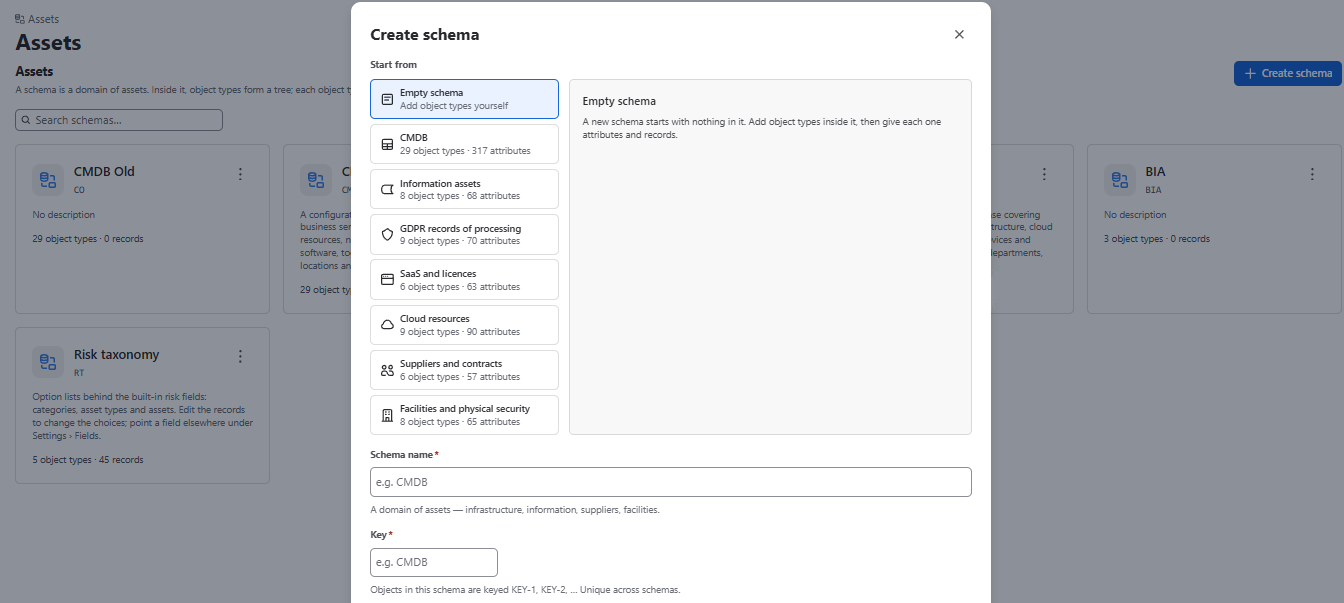
A schema is a domain of assets. Inside it, object types form a tree; each object type has attributes and records that custom fields offer as options.
Purpose: Reference data that risks refer to: information assets, systems, processes, suppliers, etc.
Permission: adm.assets – Reference data
Structure
- Schema – start from a template (Information assets, CMDB, Process inventory and BIA, Suppliers and contracts) or an empty schema.
- Object types – the kinds of things, arranged in a tree.
- Attributes – properties per type (text, number, date, select, relation to another type, etc.).
- Records – add manually, Import CSV, or Import workbook (one sheet per object type; an empty template can be downloaded).
Creating a list
- Go to Settings → Custom assets and select Create list.
- Name it in the plural — Applications, Vendors, Processes.
- Add attributes and choose the primary one.
- Add records, or import them.
Attribute types
text · number · select · boolean · date · relation
A relation points at another list and stores the target record’s identity while displaying its primary attribute. Rename the target and every reference follows automatically.
Relation depth is capped at one hop. You can filter on country.status, but not country.region.head.name. Deeper paths make expressions impossible to reason about and queries impossible to predict.
Good to know
- Records can be offered as options in risk fields.
- When a risk field points at an object type, the records grid gets a Risks column (open risks per record) and an Only with risks filter.
- Jira Assets (JSM Premium) can also be used as a source.
- Assets feed Business Impact Analysis (see Business impact).
A record has no separate name field — its name is the value of the list’s primary attribute.