Cron Expression
To enhance the backup schedule, cron expression is used. A cron expression gives you control over the frequency, compared to the default schedules. It is a simple and straightforward expression to define the backup schedule. You can find more information about how to construct the expression on the following links:
- Construct cron expressions for a filter subscription | Jira Cloud
- Crontab.guru - The cron schedule expression editor
For example, the Cron expression “0 0 * * *“ will run a backup every day on 00:00. Cron expression is a mandatory field. Non-standard cron expressions are not supported (e.g.: @yearly, @annually, @monthly, @weekly, @daily, @hourly, @reboot, etc.).
After deciding on the schedule and filling in the expression, click “Save“ button.
After clicking the “Save“ button, the first backup will be immediately executed. The following backups will be executed according to the defined schedule.
If the Cron expression is not valid (e.g. number of hours is more than 24 or the number of minutes is more than 60), after clicking the Save button, you will see the error message - “Cron expression is not valid”:
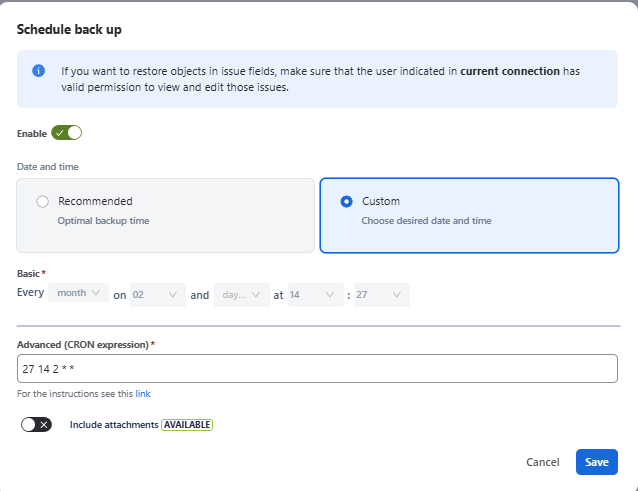
After editing the Cron expression, the modified schedule will be displayed in the “Next Backup” column in up to 20 seconds (browser refresh is needed to view the modified schedule).
Allowed frequency of backup
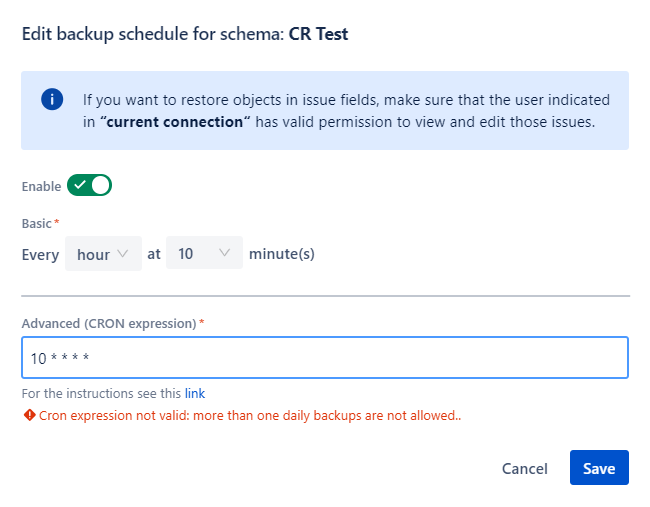
The minimum allowed frequency of backup is once per day. If the cron expression implies more frequent backups, it will not be possible to save such a backup configuration and you will see the corresponding message: