Notifications
Notifications
The app can’t send emails itself. Notifications are posted as comments on the request, so people get them through JSM’s normal notifications.
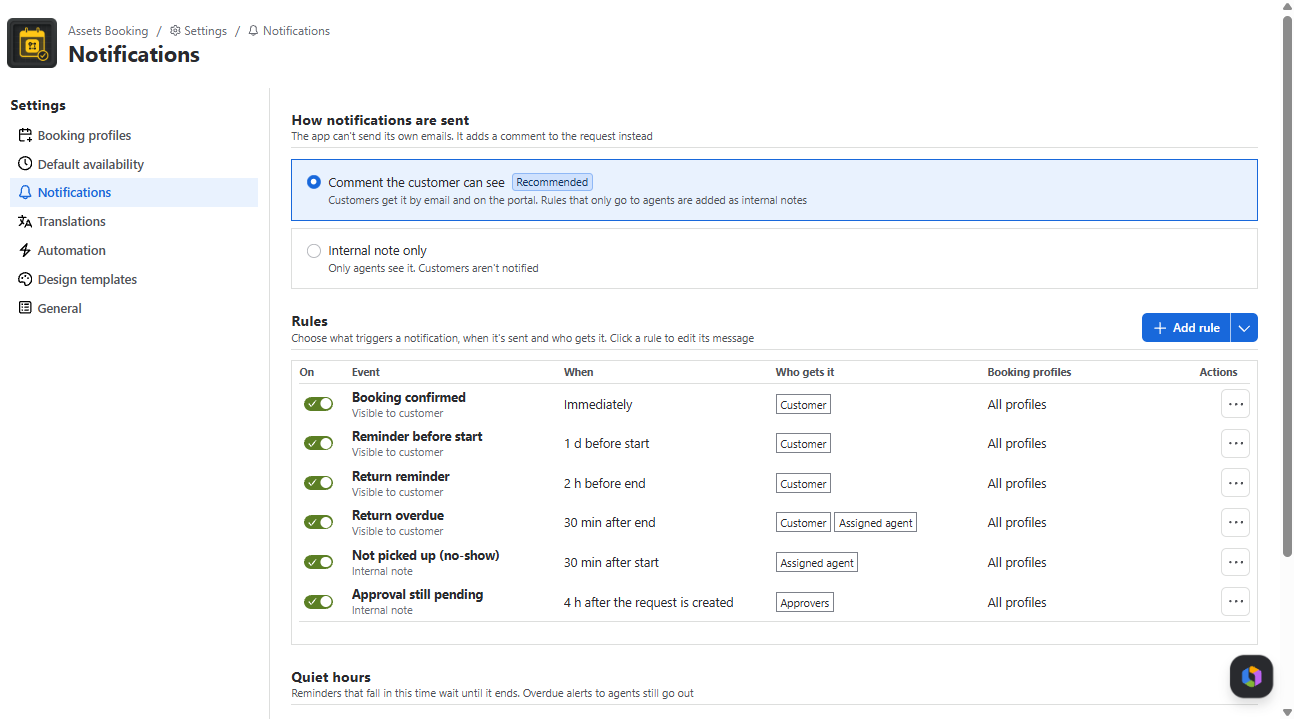
- How notifications are sent: Comment the customer can see (recommended) or Internal note only.
- Rules: each rule has an Event, When (immediately or N minutes/hours/days before/after), Who gets it (Customer, Assigned agent, Approvers, Next person on the waitlist), Booking profiles and a Message of up to 600 characters. The message can use the placeholders (asset}, {start}, {end}, {customer}, {request) and {profile).
- Events: Booking confirmed, Reminder before start, Not picked up (no-show), Return reminder, Return overdue, Waitlist: slot is free, Approval still pending, Booking changed by an agent, Affected by maintenance.
- Quiet hours: hold reminders at night (default 21:00-08:00).
Not active yet. Notification rules are saved but not sent in this version. Today customers are informed by the comments the app posts when an agent approves, declines, cancels or changes a booking, and when a portal booking fails. For other reminders, use Jira Automation (chapter 10, rules 4 and 5).
The app posts notifications as comments on the request. People get them the way they get any JSM update, so their own notification settings apply.