General
Everything on this page saves as soon as it changes.
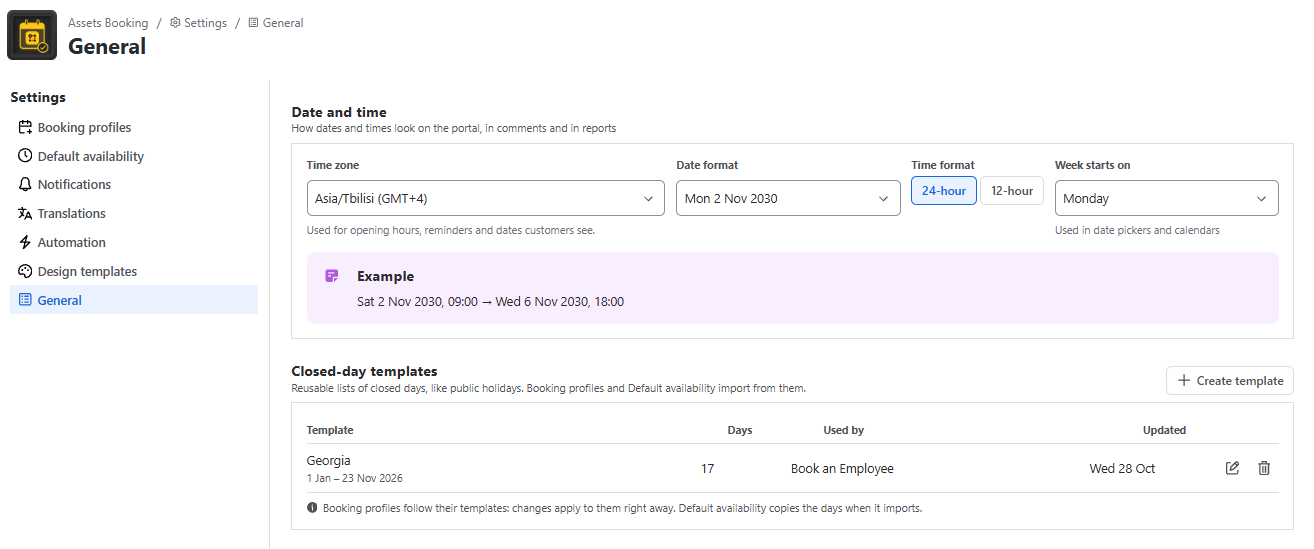
Date and Time
| Setting | Default | Used for |
|---|---|---|
| Time zone | UTC | Opening hours, notice, reminders and all dates customers see. Set this first. |
| Date format | Mon 2 Nov 2030 | Also 2 Nov 2030, 02/11/2030, 11/02/2030, 2030-11-02. |
| Time format | 24-hour | Or 12-hour. |
| Week starts on | Monday | Date pickers and calendars. Also Sunday or Saturday. |
Closed-Day Templates
Reusable lists of closed days, such as public holidays (up to 50 templates with 100 days each). Click Create template, give it a Name (e.g. Georgia public holidays 2027), then add days in any of three ways:
- Add day for one day at a time
- Import CSV, one line per day: date,name (a header line is allowed; ; also works)
- Add public holidays: pick a Country and Year, then tick the holidays to add.
Linked vs copied. Booking profiles follow their templates, so edits apply to them right away. Default availability copies the days when it imports them.
Pause Bookings
Turn on Pause new bookings to stop new bookings everywhere, for example during an audit or fleet change. Customers see your Message on the portal (up to 300 characters) instead of the booking form. Existing bookings, pick-ups and returns carry on. A banner with Resume bookings appears on the settings while bookings are paused.
Data Retention
Keep booking history for 6, 12, 24 (default) or 36 months. JSM requests and their fields are never changed.
Not active yet. The retention period is saved, but this version doesn’t yet remove old bookings automatically.
Change History
An audit log showing who changed which setting and when. Search, filter by area (General, Booking profiles, Default availability, Notifications, Design templates, Translations, Automation), open Show details on an entry, and use Export CSV (times in UTC). The latest 500 entries are shown.