Default Availability
Default Availability
These settings apply to every profile. A profile can set its own hours, but closed days and maintenance from this page always apply. A calendar beside every tab shows the result; use Check profile to see a single profile’s combined availability, and click a day to see why it is open or closed.
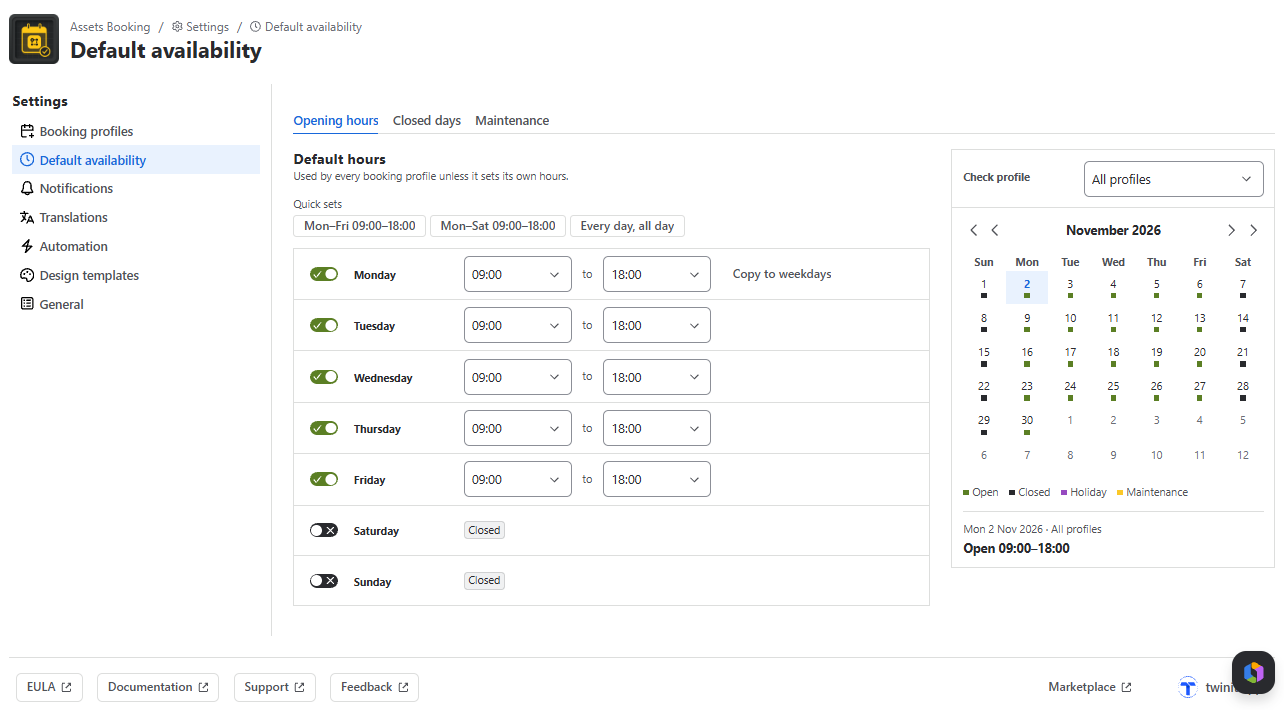
Opening Hours
- One row per weekday with an open toggle and from/to times in half-hour steps. The default is Monday-Friday, 09:00-18:00.
- Quick sets: Mon-Fri 09:00-18:00, Mon-Sat 09:00-18:00, Every day, all day.
- Copy to weekdays on Monday copies its hours to Tuesday-Friday.
- Changes save automatically (All changes saved).
Closed Days
Nothing can be booked on these days in any profile (up to 200).
- Add closed day: enter a Name, From and To (up to 366 days), and optionally Repeats every year on the same date.
- From template: copies days from a closed-day template. The days are copied, so later template edits don’t change this list.
Maintenance
Block a single asset for a service or repair; other assets stay bookable. Block an asset asks for:
- Asset
- Date
- All day or a From/To time
- A Reason such as Annual service. Customers see it on the asset card.